Instead of sorting out an old card when you arrive for a wash, update your car wash membership payment method through the business’s confirmed account-management process, then verify your renewal and wash access separately. This 2026 workflow helps Farmingdale drivers replace billing details without accidentally requesting a cancellation or starting another membership.
- To update car wash membership payment method details, confirm the existing account before replacing the card.
- Cruzinwash offers monthly unlimited wash club memberships for Farmingdale drivers seeking recurring exterior washes.
- A saved replacement card does not establish that an earlier failed renewal has been resolved.
- Confirm renewal status and wash access before treating the payment update as complete.
Why this matters
Changing a payment method and confirming membership access are different tasks. Your goal is not just to hand over another card. It is to keep the correct membership attached to the correct vehicle and establish what happens at the next renewal.
Start with Cruzinwash to establish the business’s official contact or account-management route. Use the payment-update method the business confirms; do not enter card details into an unfamiliar page found through a search result or unsolicited message.
Cruzinwash wash club memberships are best for Farmingdale drivers seeking recurring exterior washes. Keeping billing current supports that routine, but this guide does not promise uninterrupted access or a particular processing time. Ask about your account’s actual status before your next visit.
The instructions below use a staff-assisted workflow. Follow the account-management route staff provides rather than looking for assumed website buttons or an unverified membership app.
Before you start
- Gather your account identifiers. Have the member’s name, the email or phone number associated with the membership, and the vehicle information you used when joining. Keep an existing membership reference handy if you have one.
- Have the replacement payment details ready. Use a card you are authorized to use, with its current billing information. Enter sensitive details only through the payment process the business confirms.
- Check for an unresolved renewal first. Replacing a card does not tell you whether a previous payment needs separate attention. Ask whether you are updating a future renewal, resolving an earlier billing issue, or both.
For your 2026 account notes, keep 2 records: the date you requested the change and the confirmation you received. Do not store the full card number or security code in those notes.
If somebody else manages the membership, establish who is authorized to request the change before sharing payment information. That prevents an account-access problem from becoming a second, unrelated billing task.
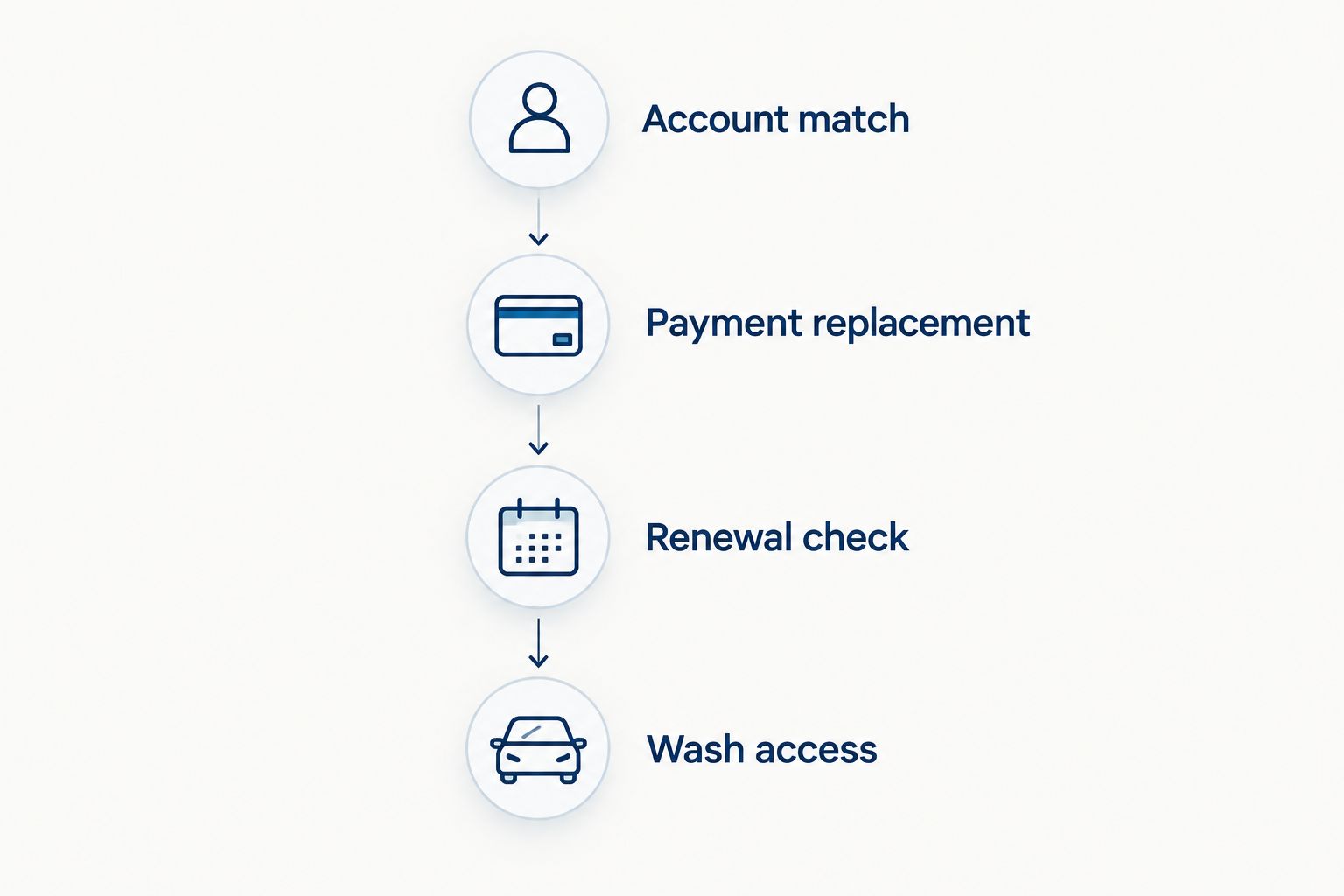
Account match
Updating the wrong record defeats the whole exercise. Identify the existing membership first, especially when your household has more than 1 vehicle or more than one person handles payments.
- State the exact request. Tell staff you want to replace the payment method on an existing membership. Make clear that you are not requesting a new enrollment, cancellation, or plan change.
- Identify the member and vehicle. Provide the account details requested through the confirmed process. If several memberships appear under your contact information, identify which one needs attention.
- Ask about the current account status. Establish whether the membership is active, awaiting payment, or subject to another account issue. Ask for an explanation of any status you do not understand.
- Confirm the renewal date. Ask which date applies to the existing membership and whether the requested billing change affects it. Do not assume the date changes when you replace a card.
Expected result: You and staff have identified the same existing membership, its current status, and the renewal that needs the replacement payment method.
Keep the request narrow. If you also want to change vehicles or service levels, separate those requests so you can verify each result independently.
Payment replacement
Use the payment-entry process staff confirms for your account. This guide does not assume that a particular portal, app, telephone process, or counter terminal is supported.
- Ask how to submit the replacement details. Follow the business’s confirmed instructions. If you receive a link, verify that it came through the official route before entering sensitive information.
- Enter the current billing information. Check the card details and billing address against the information held by your card issuer. Do not copy an old address simply because it appears in a previous record.
- Confirm the intended billing scope. Ask whether the replacement applies only to the identified membership or to other memberships associated with the account. Specify your intended scope before authorizing the change.
- Request confirmation of the replacement. Where a masked card reference is provided, check it against the replacement card without sharing the full number in a message.
Expected result: You have confirmation that the intended membership now uses the replacement payment method for the billing activity staff identifies.
Do not send a card photograph, full card number, or security code in an ordinary email or text conversation. If the requested method looks unfamiliar, stop and verify it through the official contact route.
Renewal check
A payment update needs a billing check, not just a completion message. For a 2026 card replacement, establish what happens to both the next renewal and any earlier unresolved transaction.
- Ask which renewal uses the replacement card. Get an account-specific answer rather than assuming every pending payment changes automatically.
- Ask about an earlier failed payment separately. If a renewal already failed, confirm whether another payment action is required and who must initiate it. Do not assume saving the replacement card retries that transaction.
- Confirm the membership itself remains unchanged. Ask whether the plan, vehicle association, and renewal date stay as intended. A billing update should not become an unrequested enrollment or service change.
- Keep a non-sensitive confirmation. Retain the message, receipt, or reference provided through the confirmed process. Record any next action and the date staff gives you.
Expected result: You know which renewal will use the replacement card and whether an unresolved payment still needs attention.
If staff cannot yet confirm a transaction’s outcome, ask what must happen next and when to check again. Do not submit repeated payments just to see whether one works.
Wash access
Finish with access, not just billing details. A statement that your card was updated answers a payment-record question; ask separately whether your existing membership is ready for use.
- Ask whether the membership currently permits a wash. Request confirmation before joining the wash queue, particularly if the update followed a failed renewal.
- Confirm the vehicle association. If there is an access problem, ask staff to check the membership linked to your vehicle before creating another account or buying another membership.
- Resolve any remaining action. Ask whether the account needs a payment, an authorization check, or another account correction. Complete only the action staff identifies.
- Record the final status. Note whether access is confirmed or whether you must follow up. Keep the confirmation with your other membership records.
Expected result: You know whether you can use the membership and what remains unresolved, if anything.
The completion test has 3 checks: the intended card, the correct renewal status, and confirmed wash access. A replacement card alone is not the full result.
Replace a card after a failed renewal
If your card has already been declined, start with the same account-match process. Then make the unresolved renewal the center of the conversation, not an afterthought.
These are two different starting points for the same 2026 workflow. Neither changes the need to confirm access.
| Starting point | Best for | Advantage | Limitation | What to confirm |
|---|---|---|---|---|
| Update before renewal | Drivers replacing an expiring, lost, or changed card | Lets you address payment details before the next renewal | Does not establish that a pending transaction uses the replacement | Which renewal uses the new payment method |
| Update after a failed renewal | Drivers with a known billing problem | Focuses the conversation on the unresolved renewal | A replacement card alone does not establish payment or access status | Whether another payment action is required and whether access is restored |
For a failed renewal, ask staff to distinguish a card-record update from payment of the unresolved renewal. Request the status of each before trying again.
If your bank shows a pending transaction, describe it accurately as pending. Ask the business to check its own record before you authorize another attempt; do not treat a pending entry as proof that the membership renewal is complete.
Troubleshooting
The card was updated, but wash access is not confirmed
Ask staff to check the renewal status and vehicle association separately. State when you changed the payment details and provide the non-sensitive confirmation you retained. Do not open another membership to work around an unexplained account issue.
The replacement card is declined
Check the entered details and billing information first. If they are correct, contact your card issuer about the declined transaction, then return to the business with the outcome. Avoid repeated attempts without establishing what needs correction.
The account cannot be located
Check whether the membership uses another household member’s contact information or an older email address. Provide only the identifiers requested through the confirmed process. Ask staff to search the existing membership before starting a new enrollment.
A payment appears after the card change
Match the transaction date and membership against the renewal information staff provided. Ask which billing event the transaction represents before concluding that the update failed or that a second payment occurred. Keep bank entries and business confirmations separate until the records are reconciled.
More than one household membership needs attention
Ask which memberships the payment change covers. Verify each intended membership and vehicle individually; do not assume that replacing a card for one membership updates every household record.
Customize your workflow
Use the same sequence for a routine expiration, a replacement after loss, or a change in who pays: identify the account, replace the payment details, check the renewal, and confirm access. Ask your card issuer about a lost or compromised card separately from updating the wash membership.
For Cruzinwash wash club members, billing and service coverage are separate questions. Updating your payment method does not turn an exterior membership into interior cleaning or detailing coverage. Confirm separately priced services before requesting them.
Review whether an exterior wash club membership includes interior cleaning if your next visit includes cabin cleaning. Keep that service decision separate from repairing a billing issue.
After completing your 2026 payment update, create a reminder tied to the replacement card’s expiration date. Use it to review membership billing before another replacement becomes urgent, not as a substitute for checking renewal confirmations.
Confirm your membership payment update
Start with the official site, then confirm the payment-update process for your existing membership.
FAQ
How do I update my car wash membership payment method?
Identify your existing membership, use the business’s confirmed payment-update process, and verify the renewal and wash-access status afterward. Make clear that you want a billing update, not a new membership.
Will changing my card cancel my wash membership?
Request a payment-method replacement, not a cancellation, and ask the business to confirm the membership remains as intended. Do not cancel and rejoin just to replace billing details.
Does saving a new card fix a failed membership payment?
Saving a replacement card does not establish that a failed renewal has been resolved. Ask whether another payment action is required and confirm wash access separately.
Can I update my Cruzinwash membership card online?
Confirm the current payment-update route directly with Cruzinwash before entering card details. Follow the process the business provides rather than assuming a particular portal or app is supported.
Can I wash my car immediately after changing my payment method?
Ask staff to confirm current membership access before entering the wash queue. A card-update confirmation alone does not establish that an unresolved renewal or account issue has been cleared.
Will replacing my card update every vehicle in my household?
Ask which memberships the replacement payment method covers. Confirm each intended vehicle and membership individually instead of assuming the change applies to the whole household.
Does a payment update add interior cleaning to my exterior membership?
No. Replacing payment details does not add interior cleaning or detailing to an exterior membership. Confirm the scope and separate service charges before requesting additional work.
One last thing
The most useful final question is about access: is this existing membership ready for my next wash? It makes the conversation cover the result you actually need, rather than ending at card entry.
Keep the answer with your confirmation. Your next Farmingdale wash visit should start with a clear account status, not another billing investigation.